BearQ API
Base URL: https://api.bearq.smartbear.com
Introduction
The BearQ Public API lets you create tasks, query information about them, and drive BearQ's agents remotely. It is designed around a simple model: submit work to an agent, receive task IDs, then either poll for completion or open a real-time SSE stream and wait for the terminal event. To learn more, see the SmartBear MCP BearQ documents.
What you can do
Kick off QA work programmatically. Create a task and assign it to a QA Lead, Tester, or Explorer agent via
POST /tasks.Query task progress. Poll
GET /tasks/{taskId}/statusto learn when a task finishes, or openGET /tasks/{taskId}/streamto be notified the moment it does — no polling required.Follow a task in real time. Stream live metadata and activity log entries via
GET /tasks/{taskId}/stream. Works for both running and already-terminal tasks.Inspect task details. Retrieve full metadata and the complete activity log via
GET /tasks/{taskId}.Cancel work in flight. Send
DELETE /tasks/{taskId}to stop a pending or running task.
Primary use cases
CI/CD pipelines. Trigger a Tester task on every build, stream each task ID over SSE, and block the pipeline on the
doneevent'stestRunStatus.IDE integrations. Let a developer kick off an Explorer task scoped to a functional area before pushing changes.
Agent-to-agent via MCP. BearQ exposes the same capabilities through an MCP server, so any agent that speaks MCP can drive BearQ directly.
Open-ended automation. Use the QA Lead agent with a natural-language instruction as a general-purpose escape hatch for work that does not fit a structured flow.
CI/CD example
Store BEARQ_API_KEY as a secret in your CI runner. The script below runs a full test suite, streams all tasks in parallel over SSE, and exits non-zero if any test run fails.
IDS=$(curl -sf -X POST "$BEARQ_BASE_URL/tasks" \
  -H "Authorization: Bearer $BEARQ_API_KEY" \
  -H "Content-Type: application/json" \
  -d '{"agent":"tester","mode":"run"}' | jq -r '.taskIds[]')

run_task() {
  curl -sN -H "Authorization: Bearer $BEARQ_API_KEY" \
    "$BEARQ_BASE_URL/tasks/$1/stream" \
  | awk -v id="$1" '
    /^event: done$/ { getline; sub(/^data: /, ""); print id, $0; exit }
  ' \
  | jq -e --arg id "$1" '.testRunStatus == "passed"' >/dev/null
}

PIDS=()
for ID in $IDS; do run_task "$ID" & PIDS+=($!); done

FAILED=0
for PID in "${PIDS[@]}"; do wait "$PID" || FAILED=1; done
exit $FAILED
Authentication
All endpoints except /health require an API key passed as a Bearer token in the Authorization header. Each key is scoped to a single workspace; all requests act on that workspace's data.
Authorization: Bearer <your-api-key>
Warning
Treat the API key as a secret. Anyone who holds it can act on your workspace.
How to get an API key
To get an API key, do the following:
Verify that you have workspace admin permissions. Non-admins cannot view the API key.
Sign in to BearQ at https://bearq.smartbear.com and select Settings.
Scroll to the Workspace Settings panel and copy the value from the API Key field.
Errors
All error responses use the application/problem+json format. Use the type URI — not title or detail — to branch in error-handling code, as it is stable across releases.
Error response shape
{
  "type": "https://problems-registry.smartbear.com/unauthorized",
  "title": "Unauthorized",
  "status": 401,
  "detail": "Invalid API key",
  "code": "401-01"
}
Status codes
Code | Name | When it occurs |
|---|---|---|
400 | Bad Request | Malformed request or validation failure — for example, a path parameter cannot be parsed, a required field is missing, or a field has the wrong type. |
401 | Unauthorized | The Authorization header was missing, malformed, or did not match a known API key. |
404 | Not Found | The requested resource (for example, task ID) does not exist. |
Endpoints
POST /tasks — createTask
Creates one or more tasks and assigns them to a BearQ agent. The agent field discriminates between three variants. A single request may produce multiple tasks — for example, a Tester request scoped to a functional area creates one task per test case in that area.
On success, poll GET /tasks/{taskId}/status for each returned ID, or open GET /tasks/{taskId}/stream to be notified of completion without polling.
Agents
Agent | Best for |
|---|---|
qa-lead | Natural-language instructions; chaining multiple capabilities; functionality not yet exposed through other endpoints. |
tester | Running specific test cases, all tests in a functional area, or all tests with a given tag. Ideal for CI/CD pipelines. |
explorer | Exploring the application to expand BearQ's understanding and identify new functional areas. Optionally scoped to one area. |
Request body
Content-Type: application/json. The agent field is required and selects which variant's fields apply.
Field | Type | Agent | Required | Description |
|---|---|---|---|---|
agent | string | all | Yes | Discriminator. One of qa-lead, tester, explorer. |
instruction | string | qa-lead | Yes | Natural-language description of the work. May be multi-sentence or multi-paragraph. |
mode | "run" | tester | Yes | run executes regression tests. Each mode only operates on its matching test type — mismatched IDs return 400. |
testCaseIds | integer[] | tester | No | Specific test case IDs. Mutually exclusive with functionalAreas. Omit both to target every test case of the mode's matching type in the workspace. |
functionalAreas | (int|string)[] | tester | No | Areas by ID or name. Creates one task per matching test case. Mutually exclusive with testCaseIds. |
functionalArea | int | string | explorer | No | Scope the exploration to a single area by ID or name. Omit for full-application exploration. |
Request examples
QA Lead — add test cases
{ "agent": "qa-lead", "instruction": "Add important new test cases for our product page." }Tester — run all regression tests in an area
{
  "agent": "tester",
  "mode": "run",
  "functionalAreas": ["Checkout"]
}
Tester — refine specific test cases by ID
{
  "agent": "tester",
  "mode": "refine",
  "testCaseIds": [4821, 4822, 4823]
}
Tester — run every regression test case in the workspace
{ "agent": "tester", "mode": "run" }Explorer — scope to a single area
{ "agent": "explorer", "functionalArea": "Checkout" }Responses
Status | Description |
|---|---|
200 | Task(s) created |
400 | Bad request or validation failure |
401 | Invalid or missing API key |
404 | A referenced resource was not found |
200 response body
{ "taskIds": [9183, 9184, 9185] }GET /tasks/{taskId} — getTaskDetails
Returns full metadata for a task along with its complete activity log. Use this for detailed inspection — for example, displaying progress in a UI or surfacing activity messages to a developer.
For lightweight polling, prefer GET /tasks/{taskId}/status. To follow a task in real time, use GET /tasks/{taskId}/stream.
Path parameters
Parameter | Type | Required | Description |
|---|---|---|---|
taskId | integer >= 1 | Yes | ID of the task. Example: 9183. |
Responses
Status | Description |
|---|---|
200 | Task found — returns TaskDetailsResponse |
400 | Bad request — for example, taskId cannot be parsed as a positive integer |
401 | Invalid or missing API key |
404 | Task not found |
DELETE /tasks/{taskId} — deleteTask
Cancels a task that is pending or running. Tasks that have already reached a terminal state (completed, failed, or cancelled) are unaffected — the request still returns 200.
Calling this on an already-terminal or already-deleted task returns 200 with an empty object body.
Path parameters
Parameter | Type | Required | Description |
|---|---|---|---|
taskId | integer >= 1 | Yes | ID of the task. Example: 9183. |
Responses
Status | Description |
|---|---|
200 | Cancelled, already terminal, or already deleted. Body is {}. |
400 | Bad request — for example, taskId cannot be parsed as a positive integer |
401 | Invalid or missing API key |
404 | Task not found |
GET /tasks/{taskId}/status — getTaskStatus
Returns only the task's current lifecycle status. This is the lightweight endpoint for polling. To avoid polling entirely, open GET /tasks/{taskId}/stream and wait for the done event.
Recommended CI/CD pattern: Create tasks with POST /tasks, then either poll this endpoint for each taskId until the status is terminal (completed, failed, or cancelled), or stream each task via SSE for a push-based alternative.
Path parameters
Parameter | Type | Required | Description |
|---|---|---|---|
taskId | integer >= 1 | Yes | ID of the task. Example: 9183. |
Responses
Status | Description |
|---|---|
200 | Task found — returns current status. |
400 | Bad request — for example, taskId cannot be parsed as a positive integer |
401 | Invalid or missing API key |
404 | Task not found |
200 response body
{ "status": "running" }GET /tasks/{taskId}/stream — streamTask
Streams a task's metadata and activity log as Server-Sent Events (SSE). Two primary patterns:
Wait for the task to finish without polling. Open the stream and read frames until the terminal
doneevent arrives. Useful in CI/CD pipelines that just need the final outcome.Follow a task in real time. Read each frame as it arrives to surface live progress in a UI or feed activity to an agent.
The stream works for both running and already-terminal tasks. If the task is already terminal when the stream opens, all events are flushed immediately, and the stream closes.
Event sequence
Each event is delivered as a standard SSE frame: event: <name>\ndata: <json>\n\n. Events arrive in the following order:
Order | Event | Occurs | Payload |
|---|---|---|---|
1 | metadata | Exactly once, first. | taskId, taskStatus, and metadata — same shape as GET /tasks/{taskId} without activityLog. |
2 | activityLogEntries | Zero or more frames. | Non-empty array of activity log entries. First frame carries the backlog (if any); subsequent frames carry new entries as they are emitted. |
3 | done | Exactly once, last (normal close). | { status, result, testCaseId?, testRunStatus? }. testCaseId and testRunStatus are always present on Tester tasks, absent otherwise. |
4 | timeout | Instead of done if stream times out. | { reason: "max_stream_lifetime_exceeded", message }. Re-fetch GET /tasks/{taskId}/status to get the final status. |
Path parameters
Parameter | Type | Required | Description |
|---|---|---|---|
taskId | integer >= 1 | Yes | ID of the task. Example: 9183. |
Responses
Status | Description |
|---|---|
200 | Stream opened. Frames delivered as text/event-stream until done or timeout event. |
400 | Bad request — for example, taskId cannot be parsed as a positive integer |
401 | Invalid or missing API key |
404 | Task not found |
Example stream
event: metadata
data: {"taskId":9183,"taskStatus":"running","metadata":{"type":"tester",
  "name":"Checkout","parentTaskId":null,
  "subtaskIds":[],"userId":412,"createdAt":"2026-05-15T18:04:21.123Z",
  "completedAt":null,"duration":null,
  "testCaseId":4821,"testRunStatus":"running"}}

event: activityLogEntries
data: [{"messageType":"action-message","timestampAt":"2026-05-15T18:04:22.501Z",
  "description":"Navigated to /cart"}]

event: done
data: {"status":"completed","result":"All assertions passed.",
  "testCaseId":4821,"testRunStatus":"passed"}
GET /health — getHealth (unauthenticated)
Liveness probe used by infrastructure to verify the public API is running. Returns the plain-text string OK with status 200. This endpoint does not require authentication and is not intended for application use.
Status | Description |
|---|---|
200 | Service is running. Body: OK (text/plain). |
Reference
Task lifecycle
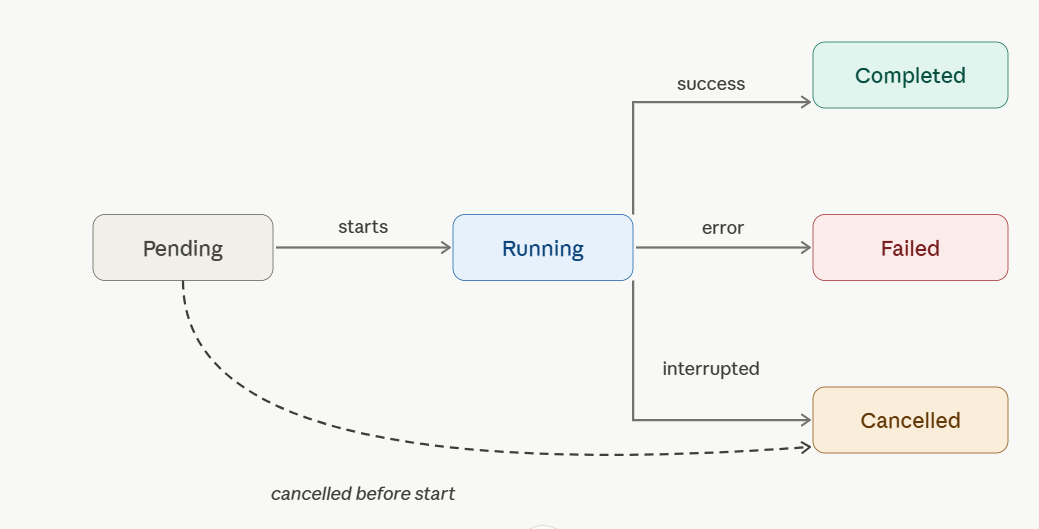
A task moves through the following lifecycle states. Once it reaches a terminal state, it will not change again.
Status | Terminal | Description |
|---|---|---|
pending | No | Created and queued. |
running | No | Currently being worked on by an agent. |
completed | Yes | Finished successfully. |
failed | Yes | Did not complete due to an error. |
cancelled | Yes | Stopped before completion — by DELETE /tasks/{taskId} or by BearQ internally. |
Note
For Tester tasks, taskStatus: completed (lifecycle) and testRunStatus: failed (outcome) can both be true at the same time — the agent finished its work, but the test it ran did not pass. These two fields are distinct.
TaskMetadata
Returned inside TaskDetailsResponse and in the metadata SSE event payload.
Field | Type | Description |
|---|---|---|
type | AgentType | Which agent owns the task: qa-lead, tester, or explorer. |
name | string | Human-readable task name derived from its type and payload. |
parentTaskId | integer | null | ID of the task that spawned this one, or null if created directly via the API. |
subtaskIds | integer[] | IDs of tasks this task spawned, in creation order. |
userId | integer | null | ID of the user who created the task, or null if created by an automated agent. |
createdAt | string (datetime) | ISO 8601 timestamp when the task was created. |
completedAt | string | null | ISO 8601 timestamp when the task reached a terminal status, or null if still in progress. |
duration | string | null | ISO 8601 duration between task start and finish (for example, PT3M34.778S), or null if not finished. |
acus | number (optional) | Agent compute units consumed. Populated only once the task reaches a terminal status. |
testCaseId | integer (optional) | ID of the test case being operated on. Always present on Tester tasks, absent otherwise. |
testRunStatus | TestRunStatus (optional) | Outcome of the test run. Always present on Tester tasks, absent otherwise. |
TaskMetadata updates
The following changes have been made to the TaskMetadata object.
New field — environment
Field | Type | Description |
|---|---|---|
environment | string (optional) | Name of the environment the task ran against. Always present on Tester tasks; absent otherwise. |
Updated Field - ACUs
Field | Type | Description |
|---|---|---|
acus | number | null | Agent compute units consumed. Always present; null until the task reaches a terminal status. |
TestRunStatus
Outcome enum for Tester tasks only. Distinct from the task's lifecycle TaskStatus.
Value | Description |
|---|---|
running | The test is currently running. |
passed | The test completed and all assertions passed. |
failed | The test completed but one or more assertions failed. |
queued | The test run is queued but not yet picked up by an agent. |
error | An unexpected error prevented the test from running to completion. |
cancelled | The test was cancelled before it could finish. |
ActivityLog entry types
Each entry in activityLog (and in activityLogEntries SSE frames) has a messageType field. The following types are unstable and may change without notice:
messageType | Description |
|---|---|
user-message | An input message (task instruction, chat input). |
agent-message | A message from the agent (response, summary, result). |
step-message | A completed test step, with its objective, outcome, and the actions taken. |
action-message | A single browser or tool action taken by the agent. |
subtask-message | A spawned subtask (for example, QA Lead analysis, refinement attempt, exploration). |
reasoning-message | Step or action execution reasoning. |
Problem (error schema)
Field | Type | Description |
|---|---|---|
type | string (URI) | Stable URI identifying the problem class. Use this for error-handling logic — it does not change between releases. |
title | string | Short, human-readable summary of the problem class. |
status | integer | HTTP status code, repeated for convenience. |
detail | string | Human-readable explanation specific to this occurrence of the problem. |
code | string | Stable machine-readable code. Examples: 400-00, 401-01, 404-01. |
GET /environments — listEnvironments
Returns the environments configured in the workspace associated with the API key.
Responses
Status | Description |
|---|---|
200 | Environment list returned. |
401 | Invalid or missing API key. |
200 response body
{
  "environments": [
    {
      "name": "Production",
      "url": "https://app.example.com",
      "isDefault": true,
      "createdAt": "2026-01-10T09:00:00.000Z",
      "updatedAt": "2026-03-22T14:30:00.000Z"
    },
    {
      "name": "Staging",
      "url": "https://staging.example.com",
      "isDefault": false,
      "createdAt": "2026-01-10T09:05:00.000Z",
      "updatedAt": "2026-01-10T09:05:00.000Z"
    }
  ]
}
Environment object
Field | Type | Description |
|---|---|---|
name | string | Environment name. |
url | string (URI) | Base URL of the application under test. |
isDefault | boolean | Whether this is the workspace's default environment. The default environment is used for tasks that do not specify one. |
createdAt | string (datetime) | ISO 8601 timestamp when the environment was created. |
updatedAt | string (datetime) | ISO 8601 timestamp when the environment was last updated. |
POST /tasks — environment field (Tester agent)
The following field has been added to the POST /tasks request body for the Tester agent.
Field | Type | Agent | Required | Description |
|---|---|---|---|---|
environment | string | tester | No | Environment name or URL to run the tests against. Accepts either the environment name (for example, |
Support
Open a ticket at support.smartbear.com/open-ticket or visit support.smartbear.com.