BearQ API
Base URL: https://api.bearq.smartbear.com
Note
Early access. Endpoints, request shapes, and response shapes may change without notice. Expect occasional breaking changes until the API is marked stable.
Introduction
The BearQ Public API lets you create tasks, query information about them, and drive BearQ's agents remotely. It is designed around a simple model: submit work to an agent, receive task IDs, then either poll for completion or open a real-time SSE stream and wait for the terminal event. To learn more, see the SmartBear MCP BearQ documents.
What you can do
Kick off QA work programmatically. Create a task and assign it to a QA Lead, Tester, or Explorer agent via
POST /tasks.Query task progress. Poll
GET /tasks/{taskId}/statusto learn when a task finishes, or openGET /tasks/{taskId}/streamto be notified the moment it does — no polling required.Follow a task in real time. Stream live metadata and activity log entries via
GET /tasks/{taskId}/stream. Works for both running and already-terminal tasks.Inspect task details. Retrieve full metadata and the complete activity log via
GET /tasks/{taskId}.Cancel work in flight. Send
DELETE /tasks/{taskId}to stop a pending or running task.
Primary use cases
CI/CD pipelines. Trigger a Tester task on every build, stream each task ID over SSE, and block the pipeline on the
doneevent'stestRunStatus.IDE integrations. Let a developer kick off an Explorer task scoped to a functional area before pushing changes.
Agent-to-agent via MCP. BearQ exposes the same capabilities through an MCP server, so any agent that speaks MCP can drive BearQ directly.
Open-ended automation. Use the QA Lead agent with a natural-language instruction as a general-purpose escape hatch for work that doesn't fit a structured flow.
CI/CD example
Store BEARQ_API_KEY as a secret in your CI runner. The script below runs a full test suite, streams all tasks in parallel over SSE, and exits non-zero if any test run fails.
IDS=$(curl -sf -X POST "$BEARQ_BASE_URL/tasks" \
  -H "Authorization: Bearer $BEARQ_API_KEY" \
  -H "Content-Type: application/json" \
  -d '{"agent":"tester","mode":"run"}' | jq -r '.taskIds[]')

run_task() {
  curl -sN -H "Authorization: Bearer $BEARQ_API_KEY" \
    "$BEARQ_BASE_URL/tasks/$1/stream" \
  | awk -v id="$1" '
    /^event: done$/ { getline; sub(/^data: /, ""); print id, $0; exit }
  ' \
  | jq -e --arg id "$1" '.testRunStatus == "passed"' >/dev/null
}

PIDS=()
for ID in $IDS; do run_task "$ID" & PIDS+=($!); done

FAILED=0
for PID in "${PIDS[@]}"; do wait "$PID" || FAILED=1; done
exit $FAILED
Authentication
All endpoints except /health require an API key passed as a Bearer token in the Authorization header. Each key is scoped to a single workspace; all requests act on that workspace's data.
Authorization: Bearer <your-api-key>
Warning
Treat the API key as a secret. Anyone who holds it can act on your workspace.
How to get an API key
You must be a workspace admin. Non-admins cannot view the key.
Sign in to BearQ at https://bearq.smartbear.com and open Settings.
Scroll to the Workspace Settings panel and copy the value from the API Key field.
Errors
All error responses use the application/problem+json format. Use the type URI — not title or detail — to branch in error-handling code, as it is stable across releases.
Error response shape
{
  "type": "https://problems-registry.smartbear.com/unauthorized",
  "title": "Unauthorized",
  "status": 401,
  "detail": "Invalid API key",
  "code": "401-01"
}
Status codes
Code | Name | When it occurs |
|---|---|---|
400 | Bad Request | Malformed request or validation failure — for example, a path parameter cannot be parsed, a required field is missing, or a field has the wrong type. |
401 | Unauthorized | The Authorization header was missing, malformed, or did not match a known API key. |
404 | Not Found | The requested resource (for example, task ID) does not exist. |
Endpoints
POST /tasks — createTask
Creates one or more tasks and assigns them to a BearQ agent. The agent field discriminates between three variants. A single request may produce multiple tasks — for example, a Tester request scoped to a functional area creates one task per test case in that area.
On success, poll GET /tasks/{taskId}/status for each returned ID, or open GET /tasks/{taskId}/stream to be notified of completion without polling.
Agents
Agent | Best for |
|---|---|
qa-lead | Natural-language instructions; chaining multiple capabilities; functionality not yet exposed through other endpoints. |
tester | Running or refining specific test cases or all tests in a functional area. Ideal for CI/CD pipelines. |
explorer | Exploring the application to expand BearQ's understanding and identify new functional areas. Optionally scoped to one area. |
Request body
Content-Type: application/json. The agent field is required and selects which variant's fields apply.
Field | Type | Agent | Req? | Description |
|---|---|---|---|---|
agent | string | all | Yes | Discriminator. One of qa-lead, tester, explorer. |
instruction | string | qa-lead | Yes | Natural-language description of the work. May be multi-sentence or multi-paragraph. |
mode | "run" | "refine" | tester | Yes | run executes regression tests; refine improves draft tests. Each mode only operates on its matching test type — mismatched IDs return 400. |
testCaseIds | integer[] | tester | No | Specific test case IDs. Mutually exclusive with functionalAreas. Omit both to target every test case of the mode's matching type in the workspace. |
functionalAreas | (int|string)[] | tester | No | Areas by ID or name. Creates one task per matching test case. Mutually exclusive with testCaseIds. Omit both to target every test case of the mode's matching type in the workspace. |
functionalArea | int | string | explorer | No | Scope the exploration to a single area by ID or name. Omit for full-application exploration. |
Request examples
QA Lead — add test cases
{ "agent": "qa-lead", "instruction": "Add important new test cases for our product page." }Tester — run all regression tests in an area
{
  "agent": "tester",
  "mode": "run",
  "functionalAreas": ["Checkout"]
}
Tester — refine specific test cases by ID
{
  "agent": "tester",
  "mode": "refine",
  "testCaseIds": [4821, 4822, 4823]
}
Tester — run every regression test case in the workspace (omit both selectors)
{ "agent": "tester", "mode": "run" }Explorer — scope to a single area
{ "agent": "explorer", "functionalArea": "Checkout" }Responses
Status | Description |
|---|---|
200 | Task(s) created |
400 | Bad request or validation failure |
401 | Invalid or missing API key |
404 | A referenced resource was not found |
200 response body
{ "taskIds": [9183, 9184, 9185] }GET /tasks/{taskId} — getTaskDetails
Returns full metadata for a task along with its complete activity log. Use this for detailed inspection — for example, displaying progress in a UI or surfacing activity messages to a developer.
For lightweight polling, prefer GET /tasks/{taskId}/status. To follow a task in real time, use GET /tasks/{taskId}/stream.
Path parameters
Parameter | Type | Required | Description |
|---|---|---|---|
taskId | integer >= 1 | Yes | ID of the task. Example: 9183. |
Responses
Status | Description |
|---|---|
200 | Task found — returns TaskDetailsResponse |
400 | Bad request — for example, taskId cannot be parsed as a positive integer |
401 | Invalid or missing API key |
404 | Task not found |
200 response body
{
  "taskId": 9183,
  "taskStatus": "completed",
  "metadata": {
    "type": "tester",
    "name": "Checkout",
    "parentTaskId": null,
    "subtaskIds": [],
    "userId": 412,
    "createdAt": "2026-05-15T18:04:21.123Z",
    "completedAt": "2026-05-15T18:07:55.901Z",
    "duration": "PT3M34.778S",
    "acus": 0.14,
    "testCaseId": 4821,
    "testRunStatus": "passed"
  },
  "activityLog": [
    {
      "messageType": "status-message",
      "timestampAt": "2026-05-15T18:04:21.200Z",
      "description": "Started"
    },
    {
      "messageType": "action-message",
      "timestampAt": "2026-05-15T18:04:22.501Z",
      "description": "Navigated to /cart"
    },
    {
      "messageType": "action-message",
      "timestampAt": "2026-05-15T18:04:24.118Z",
      "description": "Applied coupon SAVE10"
    }
  ]
}
DELETE /tasks/{taskId} — deleteTask
Cancels a task that is pending or running. Tasks that have already reached a terminal state (completed, failed, or canceled) are unaffected — the request still returns 200.
Calling this on an already-terminal or already-deleted task returns 200 with an empty object body.
Path parameters
Parameter | Type | Required | Description |
|---|---|---|---|
taskId | integer >= 1 | Yes | ID of the task. Example: 9183. |
Responses
Status | Description |
|---|---|
200 | Canceled, already terminal, or already deleted. Body is {}. |
400 | Bad request — for example, taskId cannot be parsed as a positive integer |
401 | Invalid or missing API key |
404 | Task not found |
GET /tasks/{taskId}/status — getTaskStatus
Returns only the task's current lifecycle status. This is the lightweight endpoint for polling. To avoid polling entirely, open GET /tasks/{taskId}/stream and wait for the done event.
Recommended CI/CD pattern: Create tasks with POST /tasks, then either poll this endpoint for each taskId until the status is terminal (completed, failed, or canceled), or stream each task via SSE for a push-based alternative.
Path parameters
Parameter | Type | Required | Description |
|---|---|---|---|
taskId | integer >= 1 | Yes | ID of the task. Example: 9183. |
Responses
Status | Description |
|---|---|
200 | Task found — returns current status. |
400 | Bad request — for example, taskId cannot be parsed as a positive integer |
401 | Invalid or missing API key |
404 | Task not found |
200 response body
{ "status": "running" }GET /tasks/{taskId}/stream — streamTask
Streams a task's metadata and activity log as Server-Sent Events (SSE). Two primary patterns:
Wait for the task to finish without polling. Open the stream and read frames until the terminal
doneevent arrives. Useful in CI/CD pipelines that just need the final outcome.Follow a task in real time. Read each frame as it arrives to surface live progress in a UI or feed activity to an agent.
The stream works for both running and already-terminal tasks. If the task is already terminal when the stream opens, all events are flushed immediately, and the stream closes.
For one-shot reads, prefer GET /tasks/{taskId}. For lightweight polling, prefer GET /tasks/{taskId}/status.
Event sequence
Each event is delivered as a standard SSE frame: event: <name>\ndata: <json>\n\n. Events arrive in this order:
S. No. | Event | Occurs | Payload |
|---|---|---|---|
1 | metadata | Exactly once, first. | taskId, taskStatus, and metadata — same shape as GET /tasks/{taskId} without activityLog. |
2 | activityLogEntries | Zero or more frames. | Non-empty array of activity log entries. First frame carries the backlog (if any); subsequent frames carry new entries as they are emitted. |
3 | done | Exactly once, last (normal close). | { status, result, testCaseId?, testRunStatus? }. testCaseId and testRunStatus are always present on Tester tasks, absent otherwise. |
4 | timeout | Instead of done if stream times out. | { reason: "max_stream_lifetime_exceeded", message }. Re-fetch GET /tasks/{taskId}/status to get the final status. |
Path parameters
Parameter | Type | Required | Description |
|---|---|---|---|
taskId | integer >= 1 | Yes | ID of the task. Example: 9183. |
Responses
Status | Description |
|---|---|
200 | Stream opened. Frames delivered as text/event-stream until done or timeout event. |
400 | Bad request — for example, taskId cannot be parsed as a positive integer |
401 | Invalid or missing API key |
404 | Task not found |
Example stream
event: metadata
data: {"taskId":9183,"taskStatus":"running","metadata":{"type":"tester",
  "name":"Checkout","parentTaskId":null,
  "subtaskIds":[],"userId":412,"createdAt":"2026-05-15T18:04:21.123Z",
  "completedAt":null,"duration":null,
  "testCaseId":4821,"testRunStatus":"running"}}

event: activityLogEntries
data: [{"messageType":"action-message","timestampAt":"2026-05-15T18:04:22.501Z",
  "description":"Navigated to /cart"}]

event: activityLogEntries
data: [{"messageType":"action-message","timestampAt":"2026-05-15T18:04:24.118Z",
  "description":"Applied coupon SAVE10"}]

event: done
data: {"status":"completed","result":"All assertions passed.",
  "testCaseId":4821,"testRunStatus":"passed"}
GET /health — getHealth (unauthenticated)
Liveness probe used by infrastructure to verify the public API is running. Returns the plain-text string OK with status 200. This endpoint does not require authentication and is not intended for application use.
Status | Description |
|---|---|
200 | Service is running. Body: OK (text/plain). |
Reference
Task lifecycle
A task moves through these lifecycle states. Once it reaches a terminal state, it will not change again.
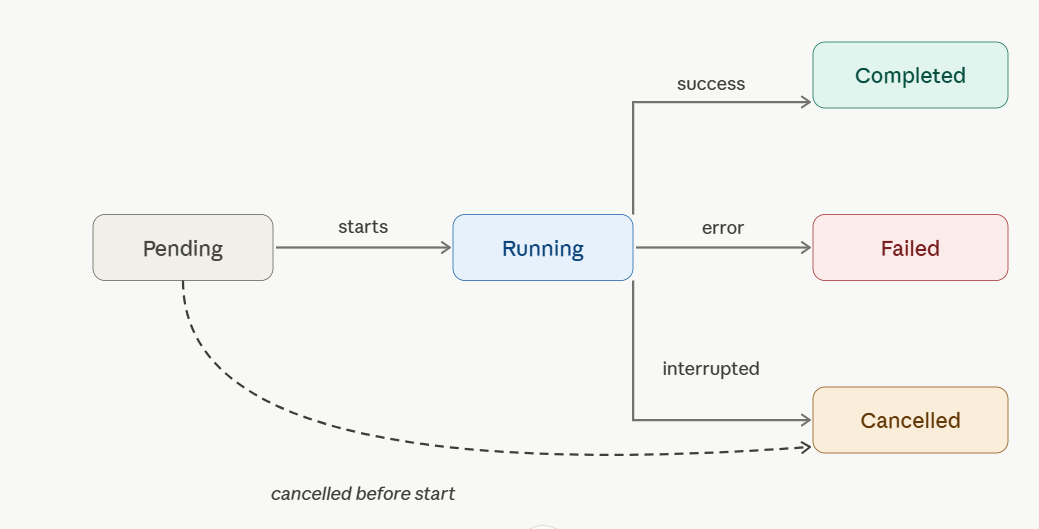
Status | Terminal | Description |
|---|---|---|
pending | No | Created and queued |
running | No | Currently being worked on by an agent |
completed | Yes | Finished successfully |
failed | Yes | Did not complete due to an error |
canceled | Yes | Stopped before completion — by DELETE /tasks/{taskId} or by BearQ internally. |
Note
For Tester tasks, taskStatus: completed (lifecycle) and testRunStatus: failed (outcome) can both be true at the same time — the agent finished its work, but the test it ran did not pass. These two fields are distinct.
TaskMetadata
Returned inside TaskDetailsResponse and in the metadata SSE event payload.
Field | Type | Description |
|---|---|---|
type | AgentType | Which agent owns the task: qa-lead, tester, or explorer. |
name | string | Human-readable task name derived from its type and payload. |
parentTaskId | integer | null | ID of the task that spawned this one, or null if created directly via the API. |
subtaskIds | integer[] | IDs of tasks this task spawned, in creation order. |
userId | integer | null | ID of the user who created the task, or null if created by an automated agent. |
createdAt | string (datetime) | ISO 8601 timestamp when the task was created. |
completedAt | string | null | ISO 8601 timestamp when the task reached a terminal status, or null if still in progress. |
duration | string | null | ISO 8601 duration between task start and finish (for example, PT3M34.778S), or null if not finished. |
acus | number (optional) | Agent compute units consumed. Populated only once the task reaches a terminal status. |
testCaseId | integer (optional) | ID of the test case being operated on. Always present on Tester tasks, absent otherwise. |
testRunStatus | TestRunStatus (optional) | Outcome of the test run. Always present on Tester tasks, absent otherwise. |
TestRunStatus
Outcome enum for Tester tasks only. Distinct from the task's lifecycle TaskStatus.
Values | Description |
|---|---|
running | The test is currently running or has not yet started executing. |
passed | The test completed and all assertions passed. |
failed | The test completed but one or more assertions did not pass. |
refined | The test was successfully improved (refine mode). |
error | An unexpected error prevented the test from running to completion. |
canceled | The test was canceled before it could finish. |
ActivityLog entry types
Each entry in activityLog (and in activityLogEntries SSE frames) has a messageType field. The following types are unstable and may change without notice:
messageType | Description |
|---|---|
user-message | An input message (task instruction, chat input). |
agent-message | A message from the agent (response, summary, result). |
step-message | A completed test step, with its objective, outcome, and the actions taken. |
action-message | A single browser or tool action taken by the agent. |
subtasks-message | A spawned subtask (for example, QA Lead analysis, refinement attempt, exploration). |
reasoning-message | Step or action execution reasoning. |
Problem (error schema)
Field | Type | Description |
|---|---|---|
type | string (URI) | Stable URI identifying the problem class. Use this for error-handling logic — it does not change between releases. |
title | string | Short, human-readable summary of the problem class. |
status | integer | HTTP status code, repeated for convenience. |
detail | string | Human-readable explanation specific to this occurrence of the problem. |
code | string | Stable machine-readable code. Examples: 400-00, 401-01, 404-01. |
Support
Open a ticket at support.smartbear.com/open-ticket or visit support.smartbear.com.